Publishing a webpage does not automatically make it eligible to appear in Google Search.
Google may discover the URL, crawl the page successfully, and still decide not to add it to the search index. This commonly appears in Google Search Console as “Crawled – currently not indexed.”
For business owners, this status can be confusing. The website is online, the article contains content, and Googlebot has already visited it. Why, then, is the page still missing from search results?
The answer is that crawling and indexing are separate decisions. Crawling means Google accessed the URL. Indexing means Google evaluated the page and selected it for storage in its search index.
This guide explains the most common reasons a crawled page remains unindexed and provides a practical process for diagnosing the problem.
What Does “Crawled – Currently Not Indexed” Mean?
“Crawled – currently not indexed” means Googlebot successfully accessed the page, but Google has not added it to the search index.
This is different from a crawling error.
The server may have returned a successful response, Google may have rendered the page, and the URL may even appear in the XML sitemap. However, Google’s indexing systems can still decide that the page should not be included at that time.
Google states that indexing is not guaranteed. Whether a page is indexed can depend on its content, metadata, canonical signals, accessibility, and relationship to other pages on the website.
The status also does not necessarily mean the page has received a permanent rejection. Google may reconsider the URL when it is crawled again, particularly after substantial improvements.
Crawling, Indexing and Ranking Are Different
These three SEO stages are often treated as though they mean the same thing.
| Stage | What Happens? |
| Crawling | Googlebot requests and downloads the URL. |
| Rendering | Google processes the HTML, CSS, and JavaScript to understand the page. |
| Indexing | Google evaluates and potentially stores the page in its index. |
| Ranking | An indexed page competes for visibility for relevant searches. |
A page can therefore be crawled without being indexed. It can also be indexed without ranking prominently for any valuable keyword.
Submitting the URL through Google Search Console only asks Google to recrawl it. It does not force Google to index or rank the page. Google says its systems prioritize the inclusion of useful, high-quality content.
Common Google Search Console Indexing Statuses
The exact status shown in Search Console helps determine where the problem begins.
a) Discovered – Currently Not Indexed
Google knows that the URL exists but has not crawled it yet.
This may happen when:
- The page is new.
- The website has many low-value URLs.
- Internal links to the page are weak.
- The server has experienced availability problems.
- Google does not consider crawling the URL an immediate priority.
b) Crawled – Currently Not Indexed
Google accessed the page but did not select it for indexing.
This commonly points to:
- Low-value or generic content.
- Duplicate or very similar content.
- Conflicting canonical signals.
- A soft 404.
- Weak search intent.
- Limited site authority.
- Content that does not justify a separate URL.
c) Duplicate Without User-Selected Canonical
Google found substantially similar versions of the content but did not receive a sufficiently clear canonical preference.
Google may therefore select another URL as the representative version.
d) Alternate Page With Proper Canonical Tag
This normally means the URL correctly points to another canonical page. The alternate URL is intentionally excluded and may not require correction.
e) Excluded by ‘Noindex’ Tag
Google found a noindex directive in the page’s HTML or HTTP header. The directive must be removed before the URL can be considered for indexing.
f) Blocked by Robots.txt
Googlebot is not permitted to crawl the URL. Because robots.txt controls crawling rather than indexing directly, blocking a URL there is not a reliable method of removing it from search results.
Why Would Google Crawl a Page but Not Index It?

1. The Content Adds Little New Information
A technically correct article can still offer insufficient value.
Consider an article titled “What Is SEO?” that provides only a definition, a list of benefits and a brief conclusion. Thousands of websites already cover the same information.
Google must decide whether adding another similar page improves its search results.
A stronger article may include:
- First-hand findings from SEO projects.
- Original screenshots from Google Search Console.
- A diagnostic process used by the author.
- Local Malaysian business examples.
- Before-and-after observations.
- Expert commentary.
- Templates or checklists readers can apply.
- Data that is not available elsewhere.
Google recommends producing helpful, reliable and people-first content. Its more recent guidance also encourages non-commodity content rather than material that could have originated from almost any publisher.
Adding more words will not solve the problem when the additional content repeats information already available elsewhere.
2. The Page Is Too Similar to Another URL
Google groups duplicate and near-duplicate pages before choosing a representative canonical URL.
Duplication can occur between:
- Two articles targeting almost identical keywords.
- Tag, category and archive pages.
- HTTP and HTTPS versions.
- URLs with and without trailing slashes.
- Parameter URLs.
- Print versions.
- Location pages with only the city name changed.
- Old and newly rewritten versions of the same article.
A canonical tag is an important signal, but Google also looks at redirects, sitemap entries, internal links and other consistency signals. When these signals conflict, Google may choose a different canonical URL.
Check both the user-declared canonical and Google-selected canonical in Search Console.
3. The Page Does Not Match a Clear Search Intent
A page may contain useful information but still lack a well-defined purpose.
For example, an article that partly explains Googlebot, partly promotes SEO services and partly discusses website performance may not completely satisfy any one search intent.
Before rewriting a page, identify the primary question it must answer.
For this article, stronger target intents include:
- Why did Google crawl my page but not index it?
- How do I fix “crawled – currently not indexed”?
- Why is my website not appearing on Google?
- How do I diagnose Google indexing problems?
The introduction, headings, examples and conclusion should all support that central problem.
4. The Main Content Is Not Clearly Available to Google
Modern websites often rely on JavaScript, tabs, accordions, pop-ups and interactive page builders.
Google can render JavaScript, but primary content should not depend on a visitor clicking, scrolling or completing another interaction before it becomes available. Google’s mobile-first guidance warns that content requiring user interaction may not be loaded for indexing.
For WordPress and Elementor websites, verify that:
- The article text appears in the rendered HTML.
- Important sections are not injected only after interaction.
- Mobile users receive the complete article.
- CSS or JavaScript required for rendering is not blocked.
- The page does not show empty placeholders to crawlers.
Googlebot currently fetches up to the first 2 MB of an individual non-PDF resource. Most normal articles will never reach this limit, but excessively large inline scripts, CSS, or base64 images can push important information too far down the document.
5. Internal Links Do Not Show That the Page Is Important
An XML sitemap can help Google discover a URL, but sitemap inclusion does not guarantee crawling or indexing.
Internal links provide additional context. They show how the article relates to the rest of the website and which pages the website considers important.
A new indexing article could be linked from:
- The main SEO service page.
- A technical SEO guide.
- The news or insights landing page.
- Articles about AI Overviews.
- Articles about website ranking problems.
- Relevant case studies.
Use descriptive anchors such as:
- Google indexing issues
- crawled but not indexed
- technical SEO audit
- why a page is not appearing on Google
Avoid using generic anchors such as “click here” or linking every SEO phrase directly to the homepage.
6. The Page Has Weak Trust and Authorship Signals
Readers should be able to understand who created the content and why that person is qualified to discuss the subject.
Instead of publishing under “Admin,” include:
- The author’s full name.
- Their role at the company.
- Relevant SEO experience.
- A short author biography.
- Links to a complete author profile.
- The date the article was reviewed or updated.
- The sources used to verify technical claims.
This does not force Google to index the page, but it makes the article more transparent and credible.
7. Google Treats the Page as a Soft 404
A soft 404 occurs when a URL returns a successful HTTP response, but Google considers the page empty, unhelpful, or equivalent to a missing page.
This may happen when:
- The page contains very little original content.
- Most of the page consists of navigation or templates.
- The content does not match the title.
- A product or service is no longer available.
- The page displays an error message while still returning HTTP 200.
Search Console normally reports soft 404s separately, but the page should still be reviewed for meaningful main content.
How to Fix a Crawled but Not Indexed Page?
Step 1: Inspect the Exact URL
Open URL Inspection in Google Search Console and check:
- The current indexing status.
- The latest crawl date.
- Whether crawling is allowed.
- Whether indexing is allowed.
- The user-declared canonical.
- The Google-selected canonical.
- The referring sitemap.
- The referring pages.
Do not rely only on a site: search. Search Console provides information directly from Google’s index.
Step 2: Run a Live URL Test
The live test helps determine whether Google can access the current version of the page.
Review the rendered screenshot and HTML. Confirm that the title, headings, body content, canonical and internal links are visible.
If the live test can see the page correctly, but the URL remains unindexed, the issue is more likely related to quality, duplication or canonical selection than basic accessibility.
Step 3: Check the Canonical Signals
The page should normally have a self-referencing canonical when it is intended to be indexed independently.
Use the exact same preferred URL in:
- The canonical tag.
- Internal links.
- The XML sitemap.
- Breadcrumbs.
- Structured data.
- Social metadata where relevant.
Remove accidental duplicates or redirect them to the preferred URL.
Step 4: Improve the Page Substantially
Do not make only cosmetic edits.
A meaningful improvement could involve:
- Reframing the article around a clearer problem.
- Adding an indexing-status comparison table.
- Including screenshots from an actual audit.
- Adding a step-by-step diagnostic workflow.
- Providing Malaysian business examples.
- Removing generic or repetitive paragraphs.
- Adding named authorship.
- Correcting inaccurate links.
- Adding a visible last-reviewed date.
Google notes that pages may remain in duplicate clusters while changes are re-evaluated, and clearer, more substantial differences can help pages separate faster.
Step 5: Strengthen Internal Linking
Add links to the updated article from at least three relevant indexed pages.
The links should be placed naturally inside the main content rather than only inside an automated Related Posts widget.
Also link from the article to useful supporting pages, such as:
- Technical SEO services.
- SEO audit services.
- Google AI Overview guides.
- Website development services.
- Related Search Console tutorials.
Step 6: Update the Sitemap
Confirm that the canonical URL is present in the XML sitemap and update its lastmod value after the substantial rewrite.
The sitemap should contain only indexable, canonical URLs.
Step 7: Request Indexing Once
After publishing the improved version, run the live test and request indexing.
Avoid repeatedly submitting an unchanged page. A request does not replace improvements to content, canonical signals, or website structure. Google may take several days or weeks to process the updated URL.
Case Study: Saramin Increased Organic Traffic by Fixing Crawling Issues
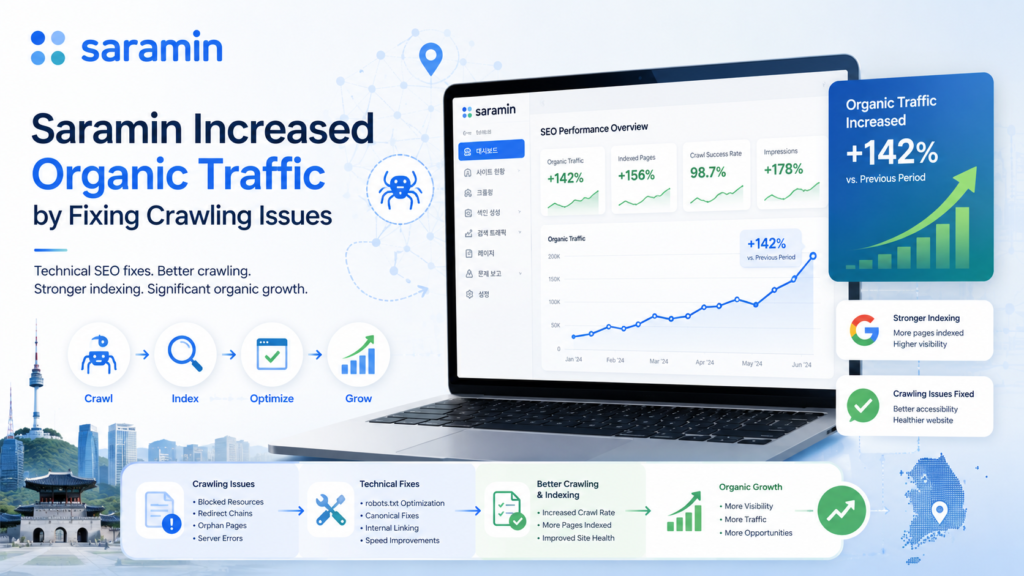
Saramin, a major Korean employment platform, provides a useful example of how crawling and indexing improvements can support business growth.
The company initially used Google Search Console to identify crawling problems and improve Googlebot access. Google’s published case study reports that these initial fixes contributed to a 15% increase in organic traffic.
Saramin later removed duplicate content, implemented canonical URLs, corrected structured data and improved mobile usability.
During its peak hiring season in September 2019, the company recorded:
- A 102% year-over-year increase in organic Google traffic.
- A 93% increase in new sign-ups from organic search.
- A 9% increase in organic conversion rate.
The result did not come from repeatedly pressing the Request Indexing button. It came from making the website easier for Google to crawl, interpret, and trust.
Crawling and Indexing Are the Foundation of SEO
Google cannot rank content that it cannot properly discover, crawl, render or index.
Keywords, backlinks and content creation remain important, but they work most effectively when the technical foundation is stable.
For a Malaysian SME, the most valuable SEO question is not simply:
“Have we published enough articles?”
A better set of questions is:
- Can Google find our most important pages?
- Are we making those pages easy to crawl?
- Does Google understand which URL is canonical?
- Is the mobile content complete?
- Are our service pages useful enough to index?
- Do our indexed pages satisfy commercial search intent?
Solving these issues can produce more than an increase in indexed URLs. As the Saramin case demonstrates, better crawling, clearer indexing signals, and stronger page quality can contribute to increased organic traffic, registrations, and conversions.
Businesses facing persistent Google indexing problems should begin with a structured technical SEO investigation rather than repeatedly submitting URLs or publishing more generic content.
FAQ
How long does Google take to index a new page?
It can take several days to several weeks. The timing depends on the website, content quality, crawl frequency, internal linking, and technical accessibility. A newly submitted URL should not automatically be considered defective after only a few days.
Does requesting indexing guarantee that the page will be indexed?
No. Requesting indexing asks Google to recrawl the URL. Google still decides whether the page should be added to its index.
Should I change the URL of an unindexed article?
Usually not. Improve the existing URL first. Changing the URL creates another discovery and canonicalization process. Change it only when the existing structure is genuinely unsuitable, and apply a 301 redirect from the old URL.
Can an indexed page still receive no traffic?
Yes. Indexing only makes the page eligible to appear. It must still compete against other pages based on relevance, quality, authority, search intent and other ranking signals.